![99745fd6-afc8-495e-a1a1-c5fa6c1501aa.png]](https://resources.spectotechnology.com/hs-fs/hubfs/99745fd6-afc8-495e-a1a1-c5fa6c1501aa.png?width=300&height=113&name=99745fd6-afc8-495e-a1a1-c5fa6c1501aa.png)
SvanNet is the cloud platform from Svantek that lets you remotely manage, monitor, and access data from your noise and vibration measurement stations, such as SV307A, SV803, SV258PRO, and other connected devices. A SvanNet license is required for some online features, including real-time data access, notifications, audio streaming, AI-based noise recognition, and integrations (e.g., FTP or cloud exports).
Index:
- Activating a License
- Deactivating a License
- What is a Svannet License?
- What Does the License Cover?
- Types of Licenses
How to Activate a License
There are two ways to activate a license, listed below and explained:
A. This step is if the License has already been applied to your account.
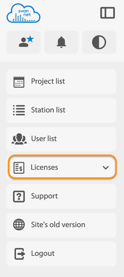
A1. Select License on the left of the ribbon

A2. Find the license that requires activation, then select the "Activate" button.
a. In the scenario where it is a device-specific license similar to SVANNET_10FTP, the license will be applied when the activate button is selected.
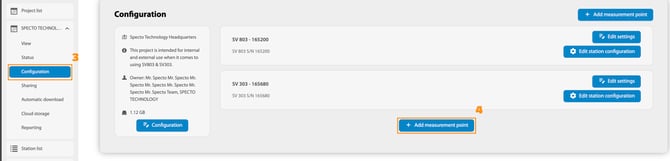
A3. Once the license is active, go into the project where the station will reside and select "Configuration".
A4. Select the "Add Measurement Point"
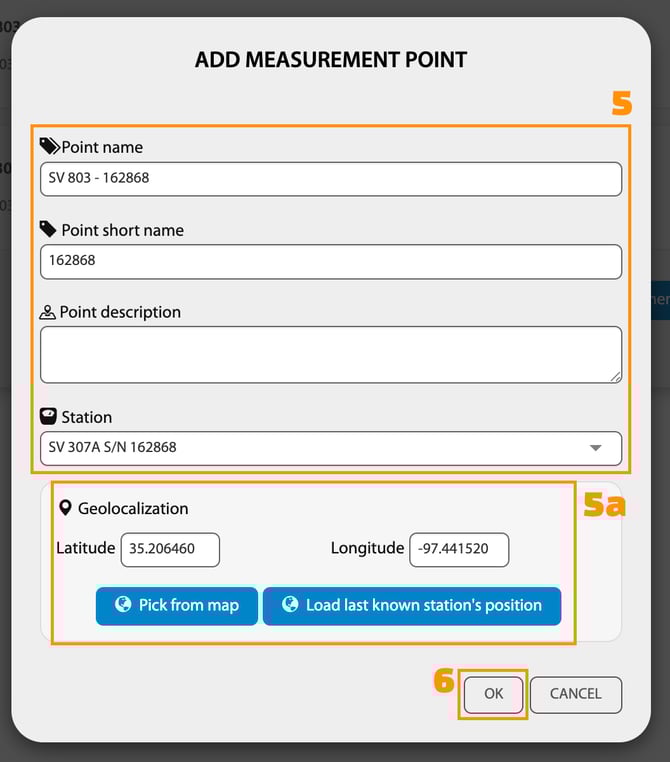
A5. Fill in all the information about the station, then select the actual station from the "Station" dropdown.
a. If applicable, put in the station's location by using "Pick from Map", "Last Known Station's Position", or manually input the longitude and, latitude.
A6. Select "OK"
- Be sure to make sure the station owner is in your name to add the station to a project
- If there is no more license available to use, the station will not be able to be added.
B. This step is if the license is not assigned to your account, and you have the license number
B1. Select License on the left of the ribbon
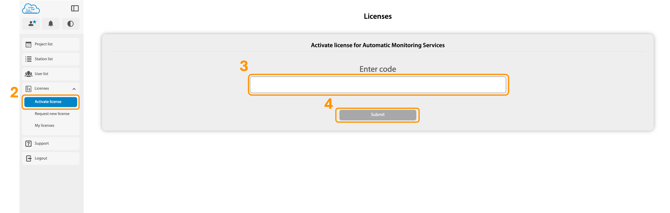
B2. Select "Activate license"
B3. Insert the code provided by Specto Technology
B4. Select Submit to apply the license to your account
How to Deactivate a License
- Select License on the left of the ribbon

- Find the license that requires activation, then select the "Cancel" button.
What is a Svannet License?
A SvanNet license grants access to SvanNet’s online platform features, allowing connected Svantek instruments to send live measurements, audio, and event data to the cloud.
With an active license, users can:
View real-time and historical data
- Access the project dashboard
- Configure alarm thresholds and alerts
- Receive email or SMS notifications* through event triggers
- Store data securely in the cloud
- View station health and diagnostics
- Access long-term reports, audio files, and event logs
- Share project access with multiple users (based on assigned roles and permissions)
What Does the License Cover?
A license typically covers:
- Number of stations (1, 5, 10, 20, 50)
- Subscription length (monthly or yearly recurring)
- Data access
- Cloud dashboard and analytics
- Event triggers & alerts
- Online device configuration
- Project sharing with other users
On top of the base account subscription, customers can add optional features such as:
- FTP export
- Additional cloud storage
- SMS credits
- AI noise classification
- Online audio listening
- Event token packages
What are the different types of Licenses?