![99745fd6-afc8-495e-a1a1-c5fa6c1501aa.png]](https://resources.spectotechnology.com/hs-fs/hubfs/99745fd6-afc8-495e-a1a1-c5fa6c1501aa.png?width=300&height=113&name=99745fd6-afc8-495e-a1a1-c5fa6c1501aa.png)
Before beginning, be sure to:
- Access to the appropriate SvanNet project
- The company and contractor name and contact information
- The project’s complete street address
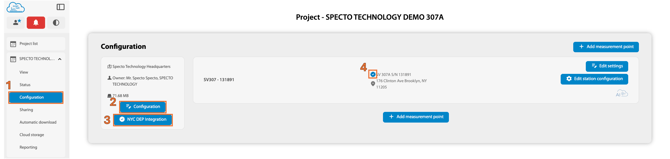
1. Open SvanNET and select the project for which you want to enable NYC DEP integration. Open the project configuration settings by selecting Configuration.
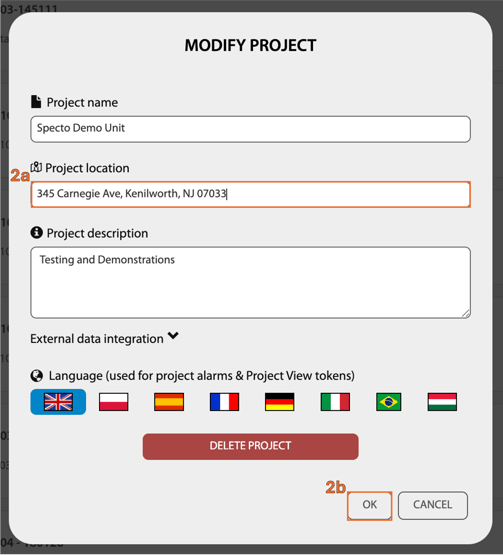
2. In the Configuration page, select Configuration.
a. In the Project location section, enter the project’s complete address.
b. Select "OK".
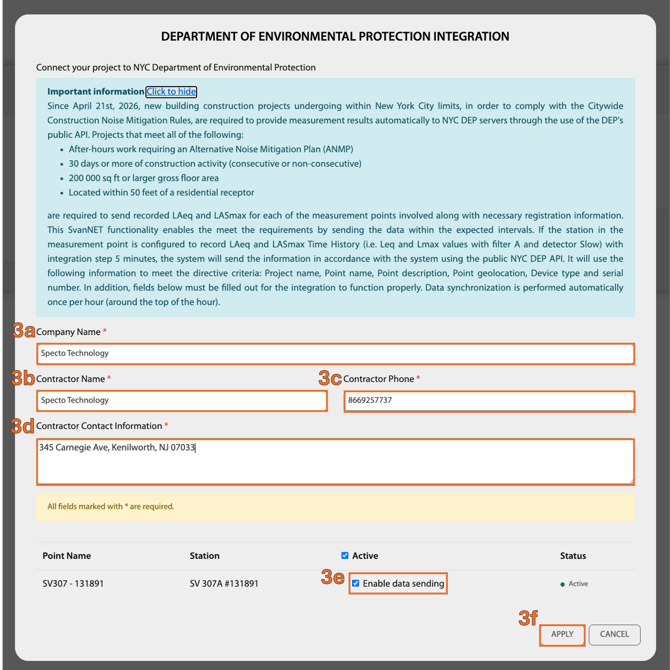
3. Select NYC DEP Integration.
a. Type in the company name.
b. Type in the Contractor Name.
c. Type in the Contractor Phone number.
d. Type in the project address.
e. Select the checkbox next to each monitoring station that should report data through the NYC DEP integration.
f. Select "Apply"
4. After activation is complete, the NYC DEP integration icon appears next to each enabled station.
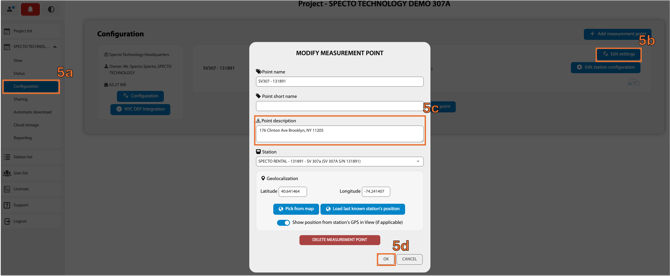
5. Update the station's address.
a. Select Configuration from the Project menu.
b. Locate the station and select Edit Settings.
c. Enter the station's full address in the Point Description field.
d. Select Ok to save the changes.
6. The DEP requires station configurations. Locate the Storage tab and click to make the Time History section match the points raised:
a. Time History Step must be 00:05:00
b. Toggle LASmax on
c. Toggle LAeq on
d. Be sure to Apply Settings to save the configuration

If an error occurs, hover over the red status indicator to view more information about the issue. If the error persists or you need additional assistance, contact Specto Technology Support at support@spectotechnology.com