![99745fd6-afc8-495e-a1a1-c5fa6c1501aa.png]](https://resources.spectotechnology.com/hs-fs/hubfs/99745fd6-afc8-495e-a1a1-c5fa6c1501aa.png?width=300&height=113&name=99745fd6-afc8-495e-a1a1-c5fa6c1501aa.png)
Log in to your Svantek / SvanNET account using your registered email address and password.
Make sure you are logging in with the account owner or administrator credentials. Support access cannot be enabled from a user account with permissions.
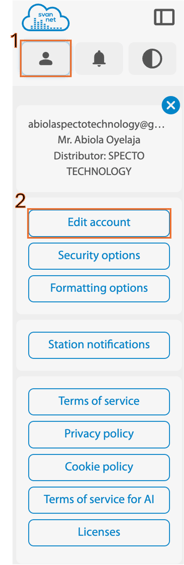
1. Once logged in, locate the Options button in the top left corner of the screen.
-
-
This button is represented by a human-shaped icon. Click the icon to open the account menu.
-
2. Select "Edit Account". This will take you to your account details page.
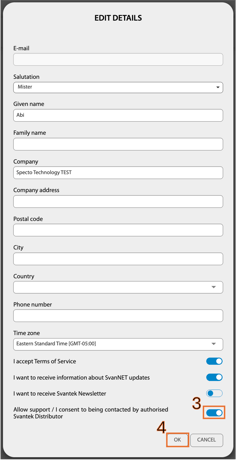 3. Toggle this option on the “Allow support / I consent to being contacted by authorised Svantek Distributor” to grant support access.
4. Click "OK" to save your settings.
-
Enabling this setting authorizes approved distributors, including Specto Technology, to view your project and station configuration for support purposes only.
-
Specto Technology will not make changes to your project without your knowledge or request.