![99745fd6-afc8-495e-a1a1-c5fa6c1501aa.png]](https://resources.spectotechnology.com/hs-fs/hubfs/99745fd6-afc8-495e-a1a1-c5fa6c1501aa.png?width=300&height=113&name=99745fd6-afc8-495e-a1a1-c5fa6c1501aa.png)
Related devices:
- Mini Powermate
- Midi Powermate
1. Basic Reset (All NOCO Chargers)
If your charger is unresponsive or behaving unexpectedly, perform a simple power reset:
-
Unplug the charger from the AC outlet or switch off its power source.
-
Wait 5–10 seconds.
-
Reconnect the charger to AC/DC power and attempt normal operation again.
2. Troubleshooting a Deeply Discharged Battery
Different NOCO products have specific recovery features when a battery is below normal detectable voltage.
A. For NOCO Genius Chargers (e.g., Genius 5, Genius 10)
Using Force Mode
Force Mode allows the charger to begin charging a battery that the unit cannot automatically detect due to low voltage.
Steps:
-
-
-
Plug the charger into AC power.
-
Attach the battery clamps securely to the battery terminals.
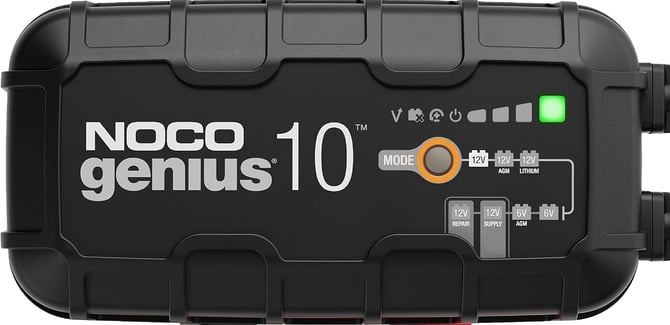
-
Press and hold the Mode button for 7 seconds until all mode LEDs begin flashing.
-
Press the Mode button again to select the proper charging profile (e.g., 12V).
-
The LED lights will “chase,” indicating that Force Mode is active for approximately 5 minutes.
-
-
Notes:
- Force Mode temporarily bypasses automatic detection to deliver a controlled charge.
- If the battery does not rise above the detection threshold within the 5-minute window, you may repeat the process once.
MANDATORY ACTION:
Once the NOCO is operating as expected, be sure to select the "Mode" button until the Lion mode is selected.
Important Safety Warning:
Manual Override disables all built-in safety protections, including reverse polarity protection.
Make sure:
-
The clamps are correctly attached,
-
The connection is secure,
-
No metal objects are touching the clamps.