![99745fd6-afc8-495e-a1a1-c5fa6c1501aa.png]](https://resources.spectotechnology.com/hs-fs/hubfs/99745fd6-afc8-495e-a1a1-c5fa6c1501aa.png?width=300&height=113&name=99745fd6-afc8-495e-a1a1-c5fa6c1501aa.png)
Improve your Victron charge controller configuration to ensure reliable battery performance in cold weather conditions. This guide provides key adjustments to help prevent battery shutdown, improve charging efficiency, and protect connected equipment when operating in lower temperatures. Cold weather can naturally reduce battery efficiency, so some decrease in performance is expected. To improve reliability, ensure ther solar panels are clean and positioned for optimal sunlight. Monitoring your system through the VictronConnect App can also help you identify issues early.
To begin, open the VictronConnect App and navigate to the battery settings. Set the Battery Preset to User Defined, then apply the remaining settings as shown in the image below. These values are based on manufacturer-recommended parameters from Battle Born Batteries and are optimized for cold weather performance.

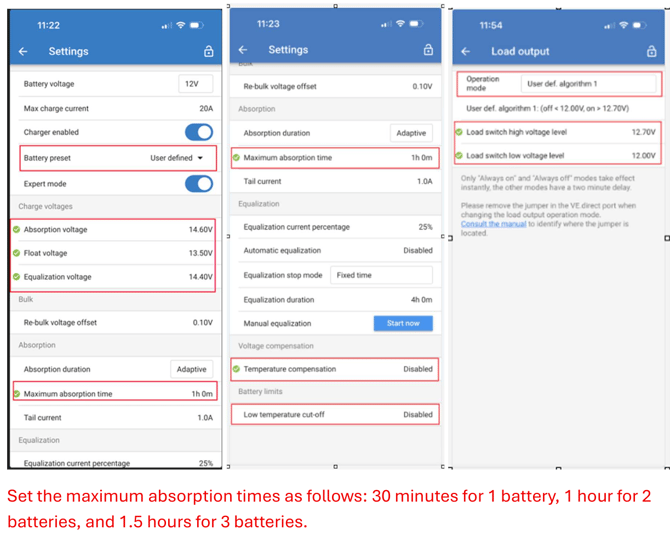
Next, configure the Load Output settings to protect the battery and connected equipment. Use a user-defined algorithm and set the load to turn off at 12.2V and turn back on at 12.7V. This prevents deep discharge while allowing the battery to recover before reconnecting the load.
11.7V or below is considered a 0 percent state of charge, which can trip the battery BMS and requires 12V or more to re-enable the battery.
If a large load is applied immediately after the battery turns back on, the voltage may drop quickly and cause the system to shut down again. To prevent this, allow the battery to begin charging first, then gradually reconnect loads. This helps stabilize the system and reduces repeated shutdown cycles.