![99745fd6-afc8-495e-a1a1-c5fa6c1501aa.png]](https://resources.spectotechnology.com/hs-fs/hubfs/99745fd6-afc8-495e-a1a1-c5fa6c1501aa.png?width=300&height=113&name=99745fd6-afc8-495e-a1a1-c5fa6c1501aa.png)
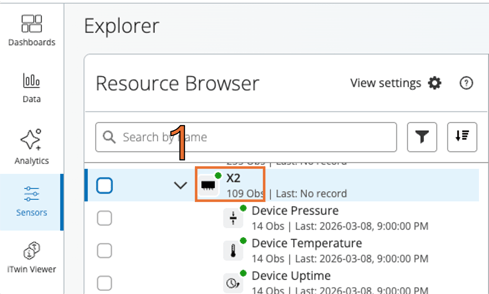
1. Navigate to the Sensor Explorer page and locate the sensor that requires configuration. Select the device title from the list to open the configuration panel.
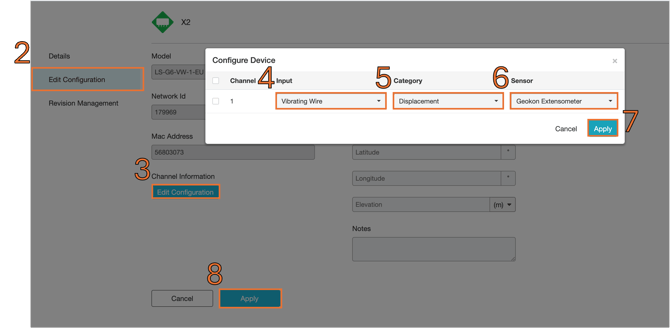
2. Select "Edit Configuration" from the sensor options
3. Select "Edit Configuration"
In the Configure Device window, set the following parameters:
| Number | Setting | Value |
| 4 | Input | Vibrating Wire |
| 5 | Category | Displacement |
| 6 | Sensor | Geokon Extensometer |
7. Select "Apply"
8. Select "Apply"
9. Return to the Resource Browser section of the page
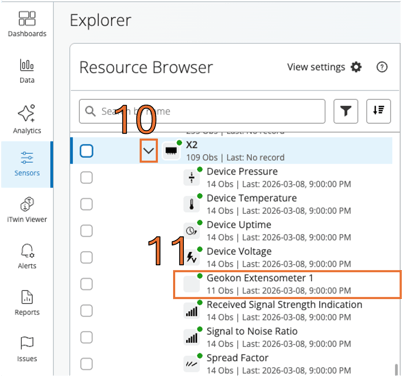
10. Select the arrow to the left of the sensor
11. Select "Geokon Extensometer"
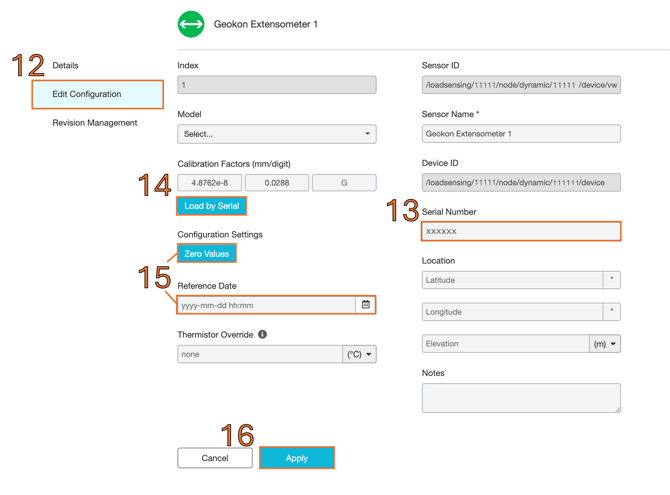
12. Select "Edit Configuration"
13. Insert the Extensometer's serial number here
14. Select "Load by Serial"
15. If the Reference Date is empty, now is the best time to apply the reference date and Zero Values Configuration Settings
16. After confirming the settings, select "Apply" to finalize the configuration.
The extensometer should now be properly configured and ready to transmit displacement measurements to the monitoring dashboard.
If the sensor does not appear correctly in the dashboard:
-
Confirm Vibrating Wire is selected as the channel.
-
Verify the serial number matches the extensometer.
-
Ensure the calibration factor is loaded correctly.
-
Confirm the device is connected and transmitting data.
Helpful links: