![99745fd6-afc8-495e-a1a1-c5fa6c1501aa.png]](https://resources.spectotechnology.com/hs-fs/hubfs/99745fd6-afc8-495e-a1a1-c5fa6c1501aa.png?width=300&height=113&name=99745fd6-afc8-495e-a1a1-c5fa6c1501aa.png)
Before beginning, ensure:
- The Carbo GX is powered on
- Bluetooth is enabled on your phone or tablet
- The VictronConnect app is installed
- You have the Wi-Fi network name and password
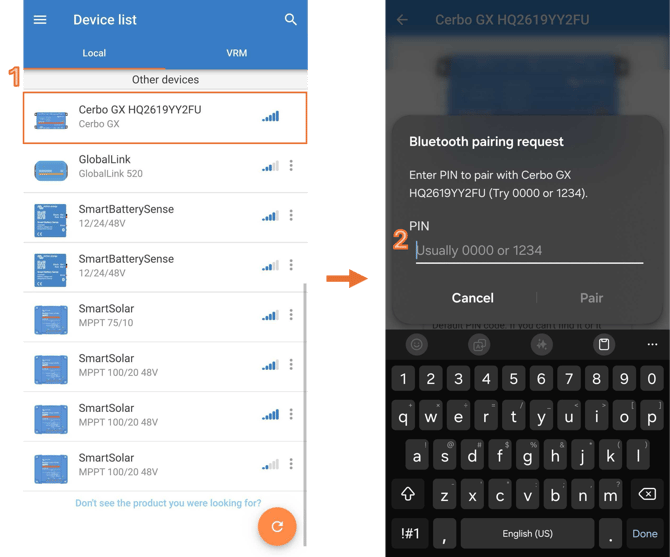
1. Open VictronConnect. Select your Cerbo GX from the list of available devices.
2. Enter the Bluetooth PIN when prompted. Locate the PIN on the label attached to the GX device.
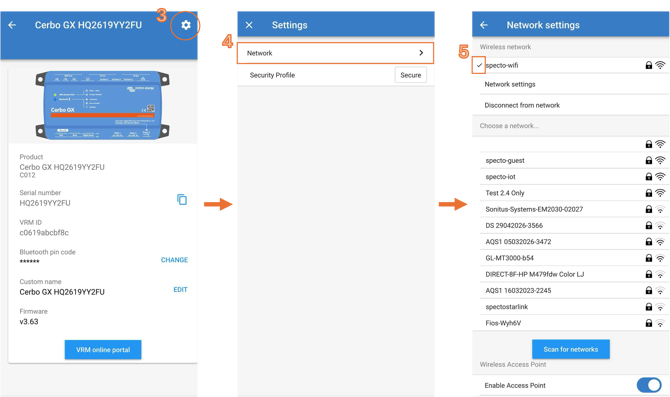
3. Open Settings. Select the gear icon in the upper right corner of the screen.
4. Select Network. Choose the Wi-Fi network you want to connect to.
5. Enter the Wi-Fi password. Follow the prompts to connect. Confirm the connection. A checkmark next to the Wi-Fi network name indicates that the Cerbo GX is connected.